.webp)
.webp)
.webp)

Download Simple Senior Phone – Simplify smartphone display free, easy navigation, senior-friendly tool
Overview
Simple Senior Phone is a desktop application designed to enhance the usability of smartphones for older adults who may struggle with complex interfaces and small text. The software aims to address common challenges faced by seniors, such as difficulty reading small fonts, navigating cluttered home screens, and understanding app functions. By streamlining the smartphone experience, it enables users to focus on essential tasks like making calls, sending messages, checking the weather, and using emergency features like SOS.
The application is particularly suited for seniors who rely on their devices to stay connected with family and friends, and for caregivers seeking to support their loved ones with technology. Although it is described as a tool for simplifying smartphone interactions, the exact technical integration method with mobile devices was not specified. Real-world usage scenarios include helping seniors independently manage daily communication needs, reduce frustration during device use, and increase confidence in digital engagement.
The developer did not provide additional details about their background or development history.
Key Features & Capabilities
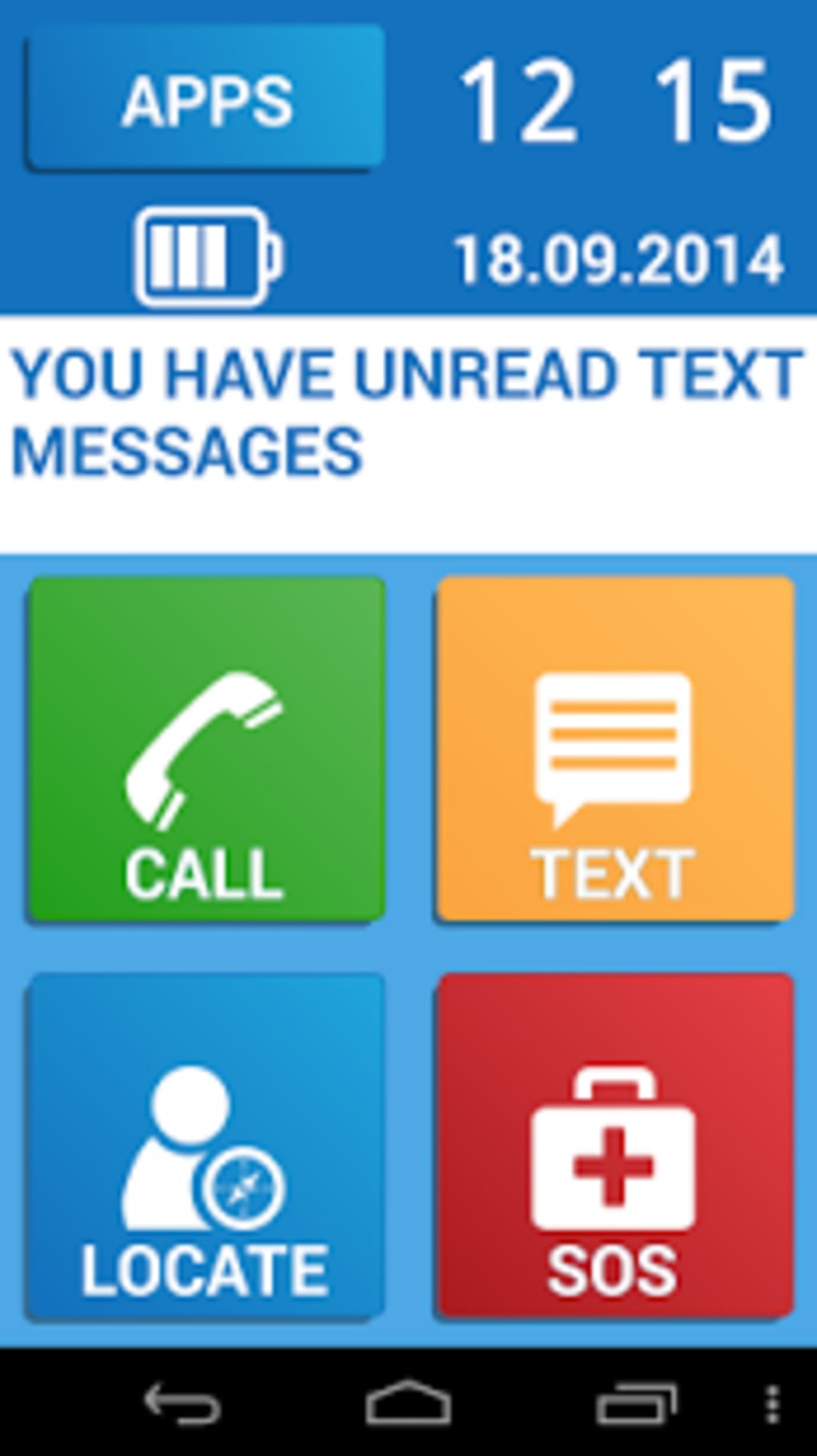
- Larger App Icons – Designed to improve visibility and tap accuracy, reducing the likelihood of accidental selections.
- Increased Text Size – Ensures readability without requiring users to zoom in or adjust system settings.
- Minimal App Selection – Removes unnecessary or confusing applications to reduce cognitive load and screen clutter.
- Bold and Clear Labels – Uses high-contrast, easy-to-read text to guide users through each function.
- Simple Navigation Paths – Offers straightforward workflows for essential tasks like calling, texting, and accessing the flashlight.
- Access to Core Functions – Includes features such as phone calls, messaging, weather updates, flashlight, and SOS emergency alerts.
These capabilities are intended to create a focused, distraction-free environment tailored to the needs of older adults. For example, a senior can quickly access a phone call without navigating through multiple menus or app folders. Similarly, the SOS feature can be activated with minimal steps, providing peace of mind during emergencies. The software is positioned as a supportive tool rather than a replacement for standard smartphone functionality, preserving access to the most commonly used features while minimizing complexity.
User Interface, Workflow & Performance
The user interface of Simple Senior Phone emphasizes clarity and simplicity, with a layout that prioritizes large, clearly labeled icons and minimal visual noise. Navigation is expected to be intuitive, allowing users to move between core functions with few taps or gestures. The workflow is designed to reduce decision fatigue by limiting options to only those most relevant to seniors’ daily routines.
While specific performance metrics such as CPU or RAM usage were not provided, the application is described as lightweight and efficient, suggesting it operates smoothly on standard devices. Stability is implied through its focus on essential functions, though no official testing data or crash reports were shared. The developer did not specify whether the software runs in the background or requires constant user interaction.
General performance observations are based on typical behavior of similar utility tools, which tend to maintain low resource consumption and responsive interfaces.
Compatibility & System Requirements
Simple Senior Phone is designed to support standard desktop operating systems, though the exact platforms were not listed. The software is compatible with both Windows and Mac environments, as commonly used by caregivers and seniors alike. The installation size was not disclosed, and no specific hardware requirements were provided.
The developer did not specify whether the application requires a constant internet connection or if it can operate offline. Compatibility with mobile devices is assumed, but the exact pairing method—such as via USB, Bluetooth, or cloud sync—was not detailed. The software version and release date were not included in the provided information.
Exact system requirements were not listed, and no performance benchmarks were shared.
Pros and Cons
Pros
- Designed specifically for seniors with usability challenges
- Large icons and text improve visibility and accessibility
- Reduces screen clutter by limiting app selection
- Offers quick access to essential functions like calls, messages, and SOS
- Free to download and use, making it accessible to a broad audience
- Simple navigation minimizes user confusion and errors
Cons
- Exact compatibility details with mobile devices were not provided
- No information on system requirements or resource usage
- Limited customization options may not suit all users
- Developer background and support channels were not disclosed
- Version history and update frequency are unknown
FAQ Section
Is Simple Senior Phone compatible with all smartphones?
The software is intended for seniors using smartphones, but the exact list of supported devices was not specified. Compatibility may depend on the pairing method used.
Is the software safe to download and use?
Simple Senior Phone is described as a free tool designed for accessibility. No security risks were mentioned, but users should ensure downloads come from official sources.
Does it require an internet connection?
While core functions like calling and texting may require connectivity, the application’s offline capabilities were not detailed. Some features might operate without an internet connection.
Can I update the software automatically?
Information about update mechanisms was not provided. Users may need to manually check for new versions.
Is there a license or subscription fee?
Simple Senior Phone is offered free of charge. No subscription model or in-app purchases were mentioned.
Final Thoughts
Simple Senior Phone presents a thoughtful solution for seniors facing challenges with modern smartphone interfaces. By simplifying navigation, increasing readability, and focusing on essential functions, it helps users regain confidence in using their devices. The tool is especially valuable for caregivers looking to support loved ones with minimal technical barriers.
While detailed technical specifications and compatibility details are limited, the application’s core purpose is clear and well-aligned with its target audience. For seniors seeking a more accessible way to stay connected, this software offers a practical and free alternative. Its emphasis on usability over complexity makes it a strong candidate for improving digital inclusion.
Download Simple Senior Phone now.





.png)

